BUILD YOUR
AI BRAIN
Still pasting the same paragraph into every AI chat?
2 hours, live. I run a 50 person agency that makes 2,000+ ads a month. I’ll show you the folder our AI works from, then run a real job through it while you watch: call notes in, a follow up and proposal you’d actually send out.
You keep the starter folder, workbook and recording, and build your own afterwards. Not useful? Reply and I’ll refund you.
For founders, business owners and marketing or growth leaders already using AI at work.
BEFORE AND AFTER
The same request, sent twice. Once to a blank chat, once to AI that reads your business files first.
- ✕ You paste the same paragraph every time
- ✕ It doesn’t know what she asked for
- ✕ You rewrite most of it before sending
- ✓ It already knows your business
- ✓ It uses her words and your real prices
- ✓ You check it, then send
NOT A JARVIS DEMO
There’s no glowing brain or wall of agents talking to each other. I run a team of nearly 50 people, and this is the setup I use every day.
Memory, Projects, custom GPTs, a Notion page of rules. They all make you the AI’s memory manager.
What you won’t see
✕ A 3D brain that looks like Jarvis
✕ 20 agents chatting to each other on screen
✕ Demos built for a video, not for real work
What you will see
✓ The folder I open every morning
✓ Workflows my team uses on client work
✓ What breaks, and how I fix it
INSIDE THE SESSION
I share my screen, set up the folder and run a workflow from start to finish. Ask questions as we go.
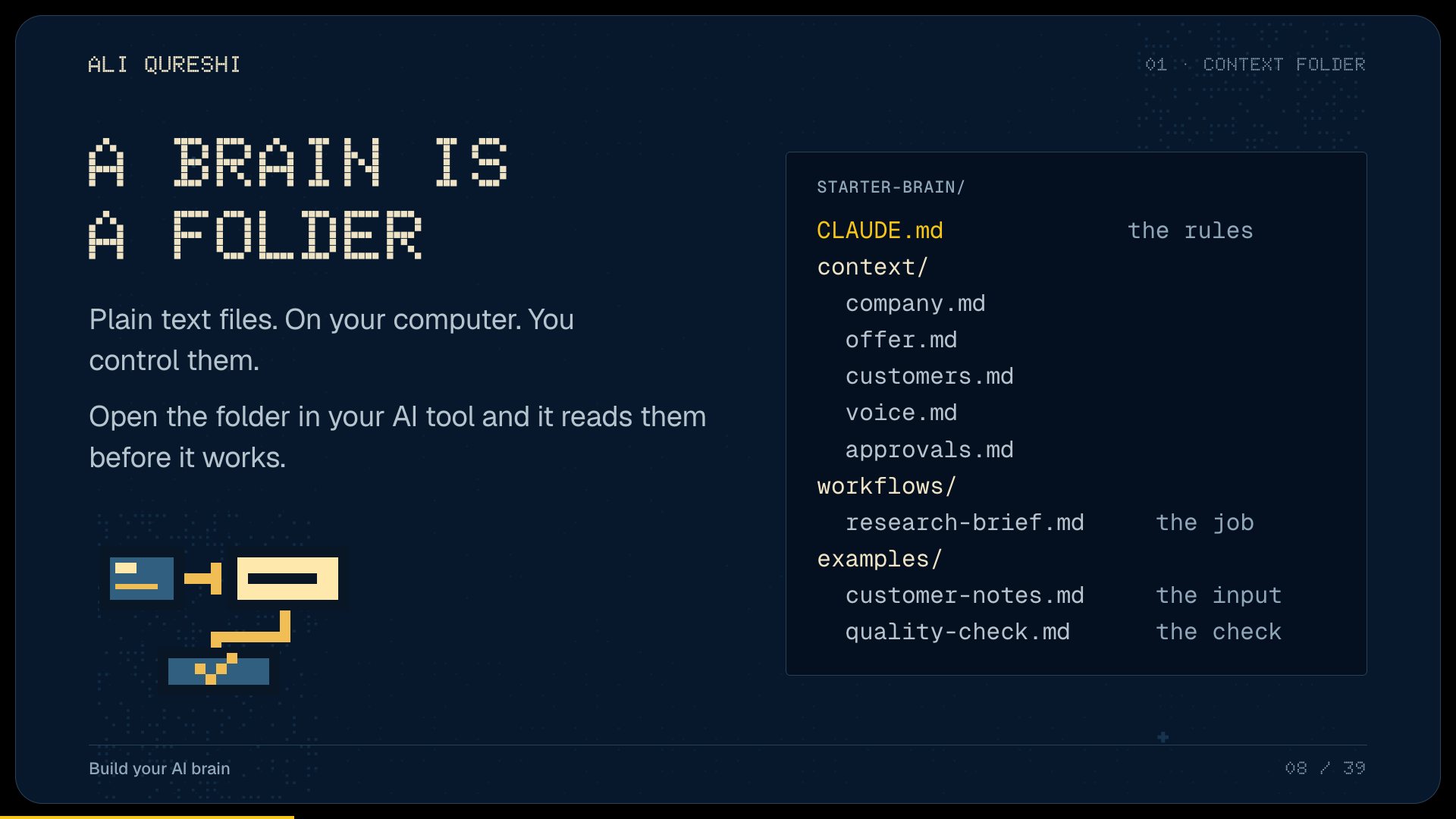

- 0:10The context folder
- 0:25One workflow
- 0:45Live run
- 1:05Fixing what breaks
- 1:15Map your task
- 1:30Your questions
2 HOURS, 6 PARTS
Live online with Ali. Ask questions as we go.
-
PART 1
Why chats forget
Every new chat starts from zero. Why pasting the same paragraph stops working.
-
PART 2
The context folder
Plain text files on your computer for your company, offer, customers and voice.
-
PART 3
One workflow
Turn a job you repeat into saved instructions, with an example of good work.
-
PART 4
The live run
Call notes to follow up and proposal, start to finish. Then I break it and fix it.
-
PART 5
Map your task
Pick a job in your business. What goes in, what comes back and who checks it.
-
PART 6
Yours to keep
The starter folder, workbook, setup guide and recording, so you can build your own afterwards.
Then I show you the setup I use at Adcrate every day.
Get on the list · $97 Thursday 19 November · 12:00 UK
Ali Qureshi
I started in tech marketing at Samsung and Huawei, then ran UK marketing for Honor. In 2022 I co-founded Adcrate, a performance creative agency.
Since then I’ve built the custom dashboards, agents and workflows that automate a lot of the agency, and trained our team to use them every day. About 90% of my own work now runs through AI. In this session I show you how I set up the context behind it.
- Huel
- Harry’s
- Tushy
- The Perfect Jean
- 1440
- InVideo
- Suno
WANT HELP SETTING IT UP?
You can build it yourself with the workshop pack. If you want me to configure it for your business, the separate $999 setup covers one operator, one AI workspace and one recurring workflow.
- Your business context populated from the documents you supply.
- One supported tool connection, agreed before you pay.
- A workflow adapted to your task, tested with your sample inputs.
- A handover where you run it yourself, plus 7 days of fixes to the agreed setup.
The $999 setup is additional to the workshop. AI and tool subscriptions are separate. We check fit, scope and availability before payment. Custom apps, always on automation and extra workflows need a separate scope.
BEFORE YOU BOOK
Do I need to be technical?
No. You’ll work with a folder of plain text files, written in plain English. The setup guide walks you through it step by step, and if you’d rather not, I’ll install it for you.
Is my business data safe?
The files live on your computer. Nothing gets shared beyond the AI tool you already use, and the starter folder uses a made up business so you can practise first.
Will it send things without me?
No. An approvals file means nothing goes out until you say yes.
Will this be out of date next month?
Tools change. Plain text files don’t. You keep them whichever AI you use.
Which AI tool do I need?
The walkthrough uses Claude Code. An AI subscription is separate from the $97 ticket.
What if it isn’t useful?
Come to the session. If it wasn’t useful, reply to your booking email and I’ll refund you.
Can you set it up for me?
Yes. After the workshop there’s a $999 install for your business. Send the fit check within a week and your $97 ticket comes off.
JOIN THE WORKSHOP
$97. Thursday 19 November, 12:00 UK. 2 hours live, with the pack and recording.